How to Edit a Text Message After You’ve Sent It
It's not too late to fix that typo...
Ever hit the Send button a little too fast? Maybe “Love you, Grandma” turned into “Love you, Drama”? We've all been there. Typos (and auto-correct woes) are just a fact of modern life.
The good news: Many modern phones now let you edit a message after it’s sent.
Here is a simple, step-by-step guide to fixing a text message on iPhone and Android.

Enjoying the Hotline Herald? Interested in getting personalized tech help? Visit our new site at Hotline.net to learn more.
The Big Rule: "Blue vs. Green"
Before you try to edit, you need to know if it will work.
Editing is a feature of internet messaging (modern chat), not old-school phone texting.
- iPhone Users: You can only edit Blue Bubbles (iMessages to other Apple users). You cannot edit Green Bubbles (texts to Android phones).
- Android Users: You can usually edit messages if your chat says "Chat" or "RCS". You usually cannot edit standard "Text" messages.
The Golden Rule: If you don't see the "Edit" option, it means that specific message was sent the old-fashioned way and cannot be changed.
iPhone: How to Edit a Sent Message
This works for iPhones running iOS 16 or newer (most phones from the last 5 years).
The Limits
- Time Limit: You have 15 minutes after sending to make changes.
- Edit Limit: You can edit a single message up to 5 times.
Step-by-Step
- Open the Messages app.
- Open the conversation where you made the typo.
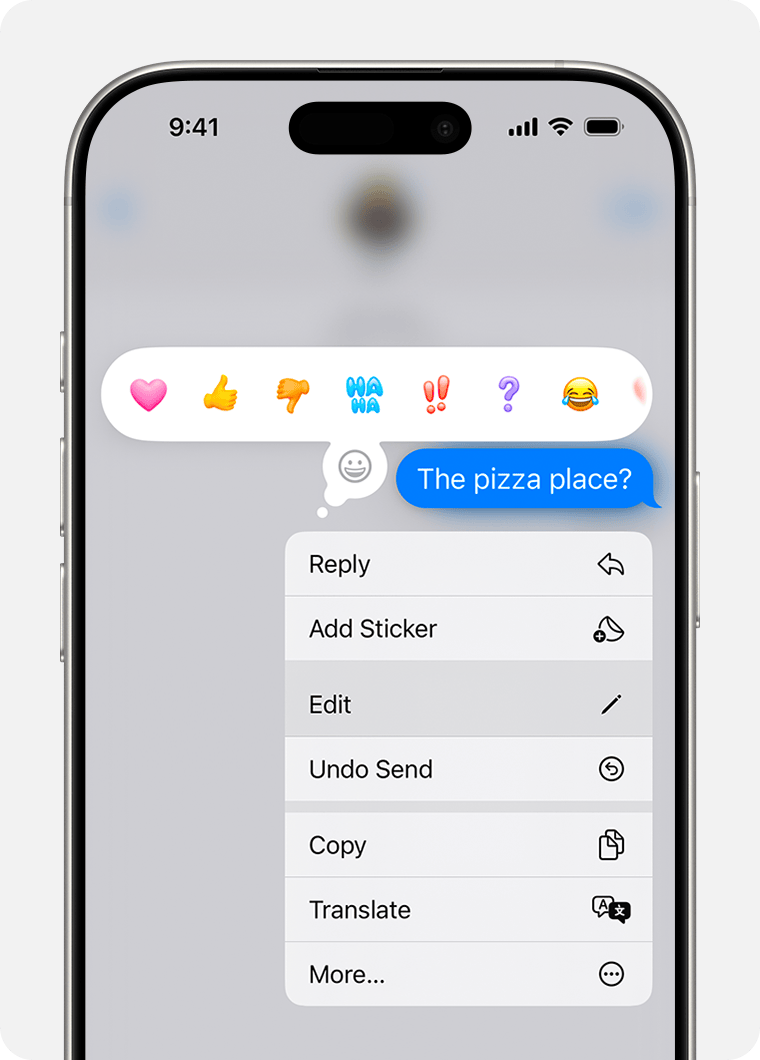
- Touch and hold your finger on the message bubble you want to fix.
- After a moment, a menu will pop up. Tap Edit.
- Fix your typo using the keyboard.
- Tap the Blue Checkmark button to save the change.
What the Other Person Sees
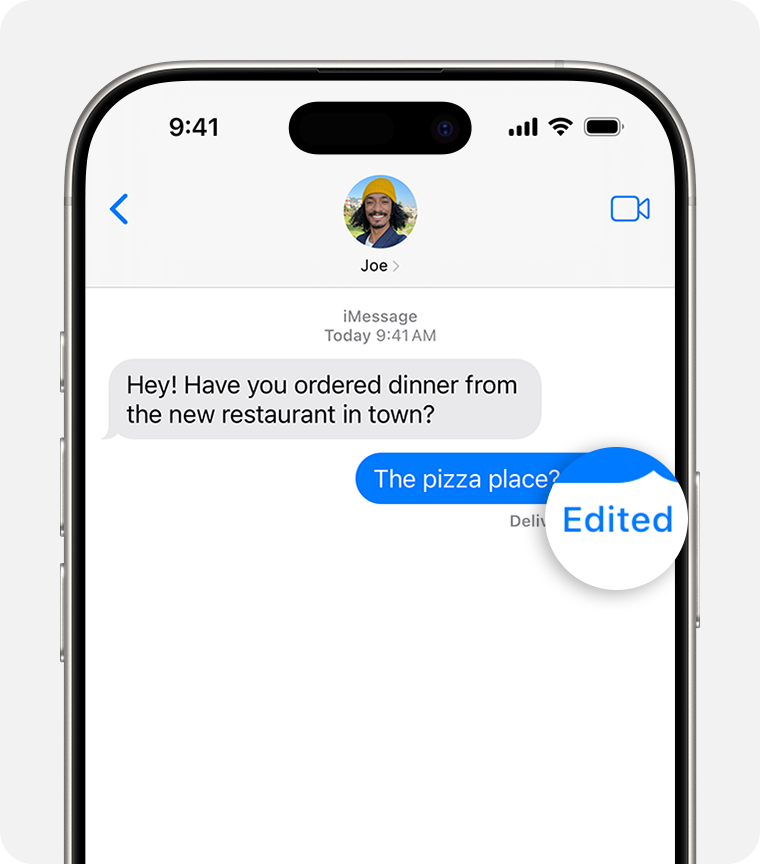
- Your message will change on their screen.
- A tiny word "Edited" will appear under the message.
- Important: If they tap that word "Edited," they can see your original typo.
Android: How to Edit (Google Messages)
Most Android phones (Samsung, Pixel, Motorola) now use the Google Messages app (the blue chat bubble icon).
The Limits
- Time Limit: You have 15 minutes to edit.
- Requirement: Both you and the other person must be using "RCS Chats" (which is usually on by default now).
Step-by-Step
- Open Google Messages.
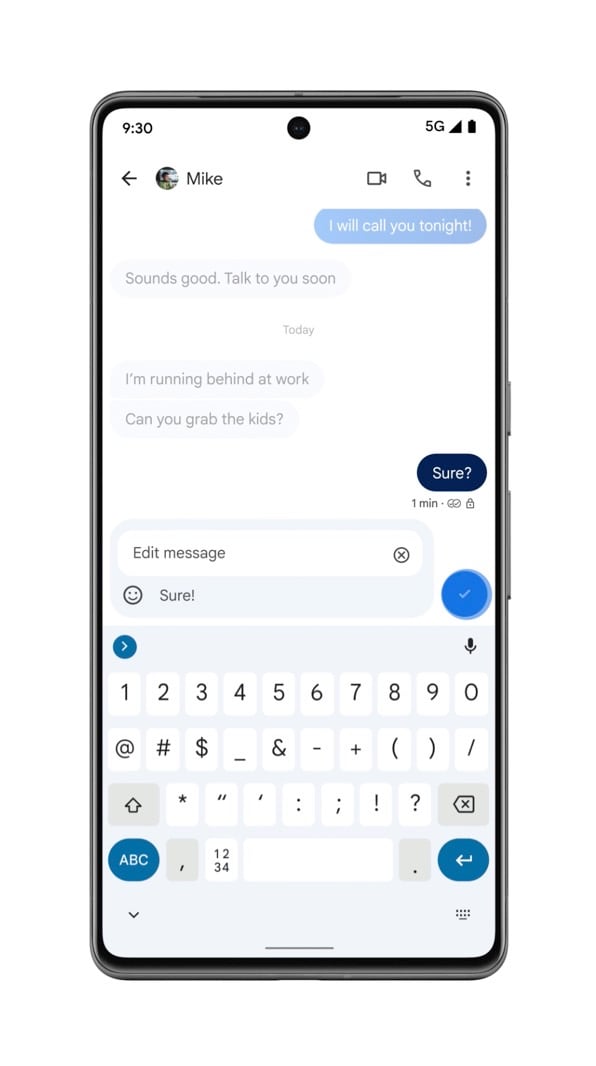
- Touch and hold the message you want to change.
- Look at the top of the screen for a Pencil Icon (Edit). Tap it.
- Fix your text.
- Tap the Check Mark or Send button to save it.
What the Other Person Sees
- They will see an "Edited" label on the message.
- If they are using an older phone that doesn't understand edits, they might just get a second text that says: "Edited to: [Your New Message]".
Samsung Users: A Special Note
If you are using a Samsung phone (Galaxy S22, S23, etc.), you might have two different texting apps installed: Samsung Messages (Yellow/Orange icon) and Google Messages (Blue icon).
- Recommendation: We highly suggest switching to Google Messages. It is much better at editing and blocking spam.
- If you stick with Samsung Messages, editing is very hit-or-miss and often only works if the other person also has a brand-new Samsung.
Troubleshooting: "Why Can't I Edit?"
If you are pressing and holding but don't see the "Edit" button, here is why:
- It's been too long: If 16 minutes have passed, the message is permanent. You'll have to send a new text explaining the typo.
- It's a "Green Bubble": If you are on an iPhone texting an Android (or vice versa), the systems don't speak the same language yet. You can't edit these texts.
- Poor Signal: Sometimes, if your internet is weak, the phone falls back to "SMS" (Old Texting), which cannot be edited.
Did You Know?
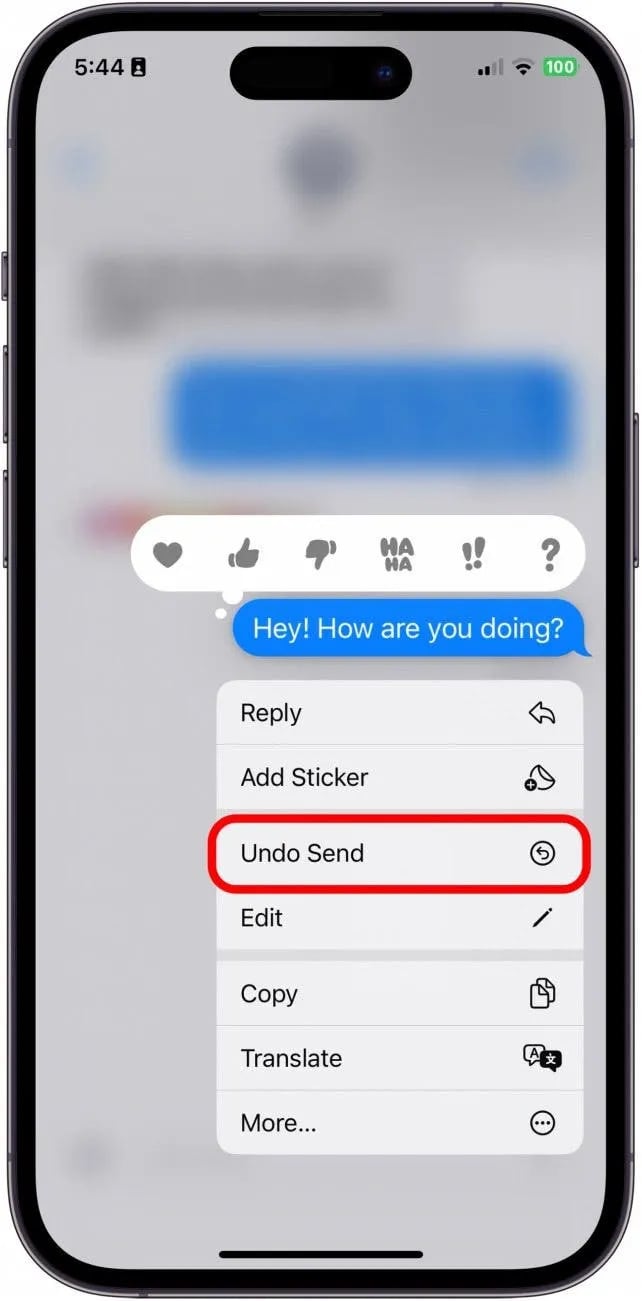
On iPhone, you can also Unsend a message entirely!
- If you sent a message to the wrong person, Touch and Hold it and tap Undo Send.
- The Catch: You only have 2 minutes to do this. After 2 minutes, you can only Edit.
The Bottom Line
Editing is a lifesaver for typos, but it’s not a magic eraser. Since the other person can see that you edited it (and sometimes see the original version), it’s best used for:
- Fixing spelling
- Correcting an address or time
- Clarifying a confusing sentence
Wishing you a week of clear messages ahead,
Steve