The Secret to Extending Battery Life Long-Term
How to get the most out of your batteries, in any device

We’ve all felt that panic when our battery icon turns red. But the real problem isn’t just running out of power today—it’s that batteries seem to get worse every year. Over time and use, batteries hold less charge. The good news? You can double your battery’s healthy lifespan just by changing how you charge it. Here is a daily routine to keep your phone, laptop, and tablet running for years.

Missed a newsletter or want to see previous issues? View them anytime here:
What’s Going On
Lithium-ion batteries (found in almost all modern tech devices) are like rubber bands. If you stretch them to their absolute limit (100%) or let them go completely slack (0%) over and over, they eventually lose their snap. Batteries prefer a “sweet spot” in the middle. Most of us, however, force them into the extremes every single day.

Why It Matters
Batteries are made of chemicals that degrade over time. A mistreated battery might only last 2 years before it struggles to hold a charge, while a well-cared-for one can last 4 or 5 years. By following these checks, you save money on expensive battery replacements and keep your device out of the landfill.
Your Daily Checklist
You don’t need to obsess over every percentage point. Just keep these rules in mind when you plug in.
1. Aim for the “80/20 Rule”
The golden rule of battery health is simple: try to keep your charge between 20% and 80%.
Avoid 0%: letting a battery die completely causes chemical stress and shortens its life. If your battery does hit 0%, be sure to plug it in as soon as possible.
Avoid 100%: keeping a battery pinned at 100% (especially while hot) is like keeping a rubber band stretched tight forever. Give it time to “relax” and settle in at or below 80%.
2. Watch the temperature (The Real Enemy)
Heat kills batteries faster than anything else.
Don’t charge under a pillow or by a window: If your phone gets hot while charging, take the case off or move it to a hard, cool surface. Avoid letting your device charge by a window or in direct sunlight.
Avoid extreme cold: Don’t leave your laptop in a freezing car overnight; it can damage the battery just as much as heat.
3. Stop “Night Charging” (If you can)
Leaving your phone plugged in for 8 hours while you sleep isn’t strictly dangerous, but it keeps the battery in a high-stress state (100%) for hours.
Try this instead: Charge it while you get ready in the morning or while you’re at your desk.
Modern fix: If you must charge at night, enable “Optimized Battery Charging” if your device has it (see step 5).
4. Prefer “Sipping” over “Gulping”
Batteries prefer short, frequent charges rather than one long marathon charge from 0% to 100%.
It is perfectly safe (and actually better) to plug your phone in for 20 minutes here and there throughout the day.
5. Check your settings
Your device likely has built-in tools to help you do this automatically, especially if it was purchased in the last few years.
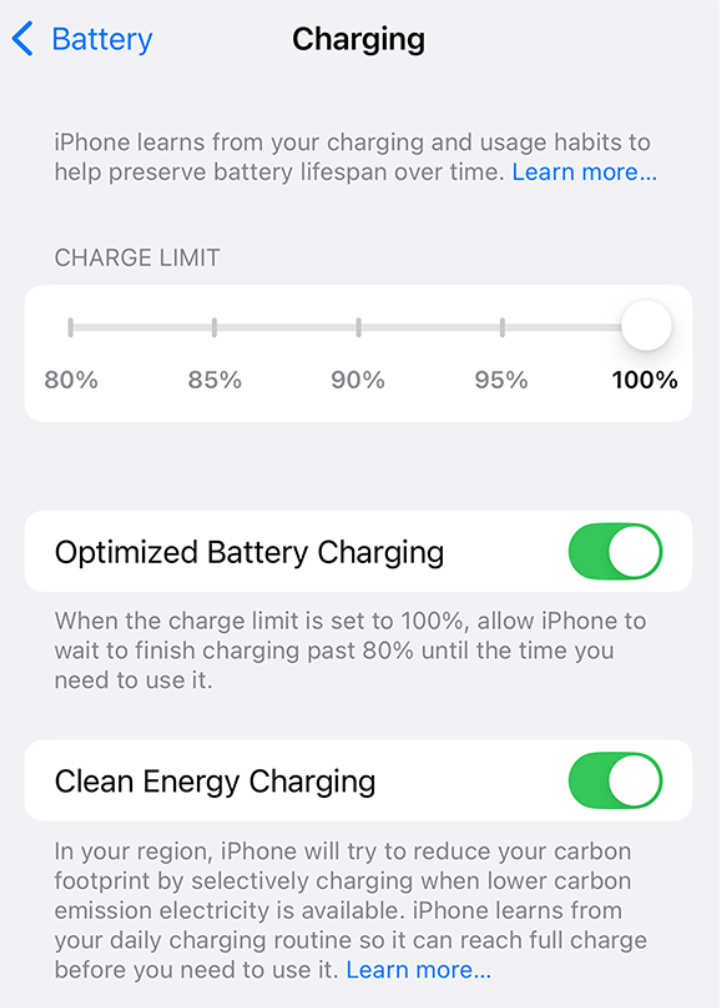
iPhone: Settings > Battery > Battery Health & Charging > Turn on Optimized Battery Charging (or “80% Limit” on newer models).
Android: Settings > Battery > turn on Adaptive Charging or Protect Battery.
Laptops: Look for “Smart Charging” or “Conservation Mode” in your manufacturer’s settings app (like Lenovo Vantage or MyASUS) which caps charging at 60-80% for desk users.
What You Can Do Next
If you want to see how your battery is currently doing, take these steps:
Check your “Cycle Count”: (See Tech Term below). On MacBooks and some phones, you can see exactly how many cycles your battery has used. This can help you understand the lifespan of your battery—and decide when it might be time for a replacement.
Enable the “80% Limit”: If you have a newer iPhone (15 or later), you can set a hard limit so it never charges past 80%.
Use the “slow” charger: If you aren’t in a rush, use an older, slower 5W charger overnight. Fast chargers generate more heat, which adds stress.
Store it at 50%: If you are putting a gadget away in a drawer for a month, charge it to 50% first. Do not store it empty or full.
Tech Term Explained
Charge Cycle: A “Cycle” is using 100% of your battery’s capacity—but not necessarily all at once. If you use 50% of your battery today, charge it, and use 50% tomorrow, that counts as one single charge cycle, not two.
Why it matters: Batteries are rated for a specific number of cycles (usually 300–500 for phones) before they start to degrade. The slower you use up these cycles, the longer your phone lasts.
Did You Know?
The advice to “let your battery drain to 0% before charging” is a myth left over from the 1990s. Old Nickel-Cadmium batteries had a “memory effect” where they would forget their capacity if you didn’t drain them. Modern Lithium-Ion batteries are the opposite: they hate being drained to zero. You are actually helping your battery by charging it whenever you can!
You’ve Got This
Extending your battery life doesn’t mean you have to be a slave to the charger. Just avoiding the extremes—0% and 100%—and keeping your device cool will make a massive difference.
Wishing you and your batteries a healthy week,
Steve